When a printer, a developer or a designer asks you for “the logo as an SVG”, it isn't a professional whim. This format really changes what you can do with your logo. Here is what it brings, and the pitfalls to know so you don't get caught out.
What is an SVG?
SVG stands for Scalable Vector Graphics. Instead of storing millions of coloured dots, like a JPG or PNG, an SVG describes the logo with formulas: “a curve that starts here and passes through there”. It's text, which you can open in any editor. Here is the start of the example logo's file:
<svg xmlns="http://www.w3.org/2000/svg"
     width="300" height="129" viewBox="0 0 300 129">
  <path fill="#0e0e0e" fill-rule="evenodd"
        d="M142.33 12.93C113.85 12.95 90.77 36.05 …"/>
</svg>
The seven concrete advantages
1. It stays sharp at every size
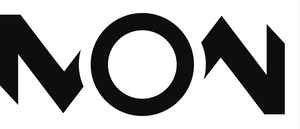
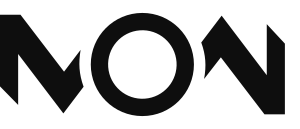
A formula is recalculated at whatever size you need, from 16 pixels (a favicon) to several metres (a sign). Here is the same logo as a 300-pixel JPG (left) and as an SVG (right):
2. It is very light
In my example, the logo weighs 2 KB as an SVG, against 4 KB for the 300-pixel JPG and 48 KB for a 1,200-pixel PNG. A light logo loads faster on a website and in an email.
3. It looks perfect on high-definition screens
Retina and 4K screens display two to four times more dots than a standard screen. A PNG made for a standard screen looks blurry there; an SVG adapts automatically.
4. Its colours change in one line
On a website, an SVG can be recoloured with CSS, for example to turn it light in dark mode:
.logo path { fill: currentColor; }
@media (prefers-color-scheme: dark) {
  .logo { color: #F7F4ED; }
}
5. It's editable
You open it in Illustrator, Inkscape or Figma to change a shape, a colour, move a point. With a JPG, you have to redraw everything.
6. It can be animated
An SVG logo can draw itself on screen, change colour on hover or react to page scrolling, without any extra video or image.
7. It's the base for every other format
From a clean SVG, you get a PDF, EPS or DXF without loss for printing, embroidery or cutting. Conversely, you can never cleanly go back from a small JPG to a vector. See a logo's file formats (in French).
The pitfalls to know
- The fake SVG. Some “.svg” files only contain a JPG or PNG image wrapped inside: they're just as blurry as before. A simple test: open the file in a text editor. If you see lines of numbers and letters like those above, it's real vector; if you see a huge block of characters starting with
data:image, it's fake. - Fonts. If the logo contains text, it must be converted to outlines, or it will look different on a computer that doesn't have the font.
- Not every service accepts it. Many email programs, social networks and document editors ask for a PNG or JPG. So keep PNG exports alongside your SVG.
- Complex effects. Some gradients, shadows and filters display differently depending on the software.
- Be careful with unknown SVGs. An SVG is text that can contain code. Don't open or import an SVG from a dubious source.
How do you get a real SVG of your logo?
- Find the original file from whoever created the logo: it's the best starting point.
- Have it traced by hand by a designer: see what vectorisation changes (in French) and my manual vectorisation service.
- Make do with Contour, a free tool that vectorises in your browser (see its presentation).
Frequently asked questions about the SVG format
Is an SVG better than a PNG for a logo?
For sharpness, weight and flexibility, yes. But PNG remains useful where SVG isn't accepted, like emails or some social networks. The safest approach is to keep both.
How do I know if my SVG is real vector?
Open it in a text editor. If it contains drawing formulas (letters and numbers like M, C, L), it's vector. If it contains a huge block starting with data:image, it's a wrapped image.
Can I use an SVG in an email or on a social network?
Rarely. Many services refuse SVG or display it badly: use a transparent-background PNG.
Can an SVG be printed?
Yes, but printers often prefer a vector PDF or EPS. A clean SVG converts without loss to these formats.
My take as a designer
The SVG is the file I deliver first, because everything else flows from it: the PNG for the web, the PDF for the printer, the DXF for cutting. When a client tells me they only have “the PNG”, I know the trouble will start with the first sign.
A logo without a vector file is a logo whose future you don't control.
To sum up
SVG describes a logo with formulas: sharp at every size, light, recolourable and editable.
Beware of fake SVGs, fonts not converted to outlines and services that don't accept it.
Always ask for it, and keep PNGs for uses where SVG isn't accepted.