You open your logo at a large size, and the edges are soft, jagged, with little specks around the letters. Or you send it to the printer, who tells you “the file isn't sharp enough”. Don't worry: a blurry logo is almost never lost. Here is why it happens, how to diagnose it in three minutes and how to fix it.
Blurry or pixelated: what are we talking about?
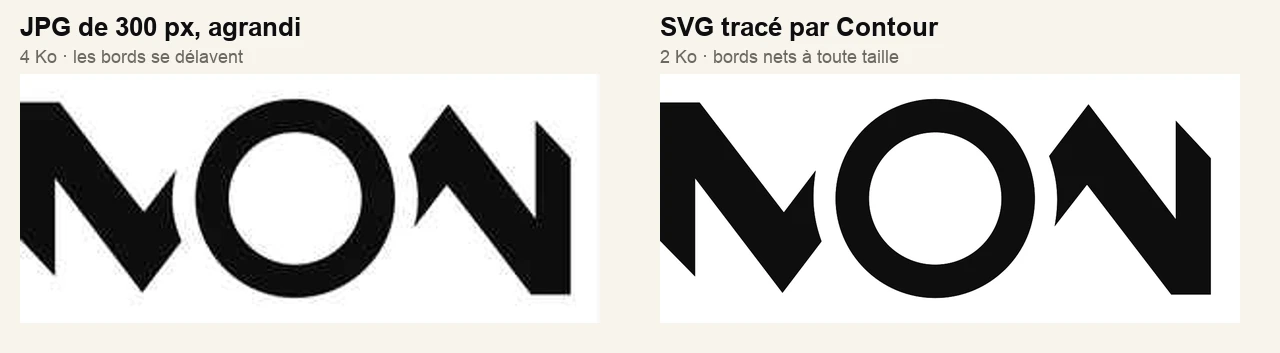
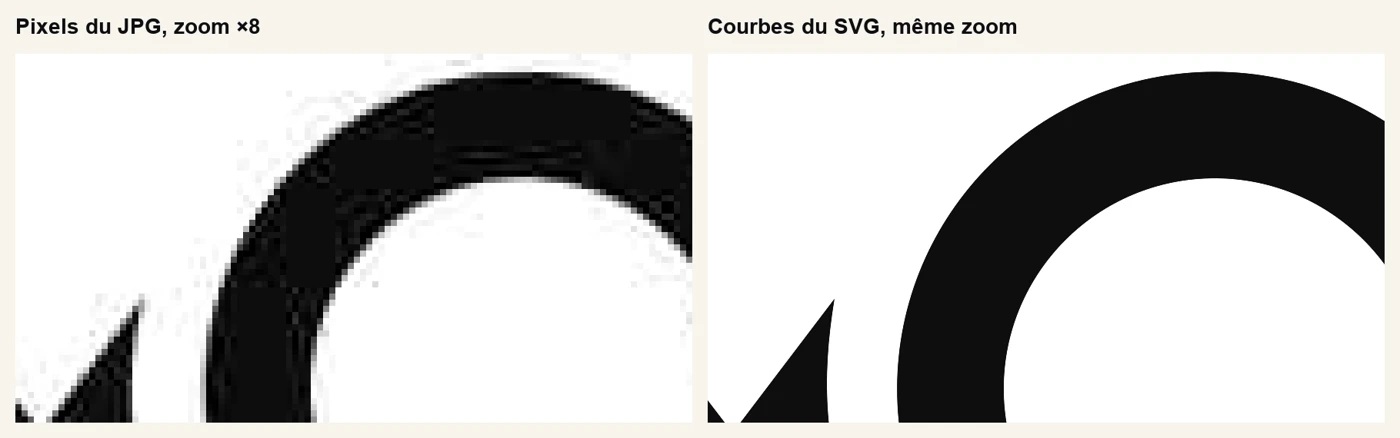
A standard digital image (JPG, PNG, GIF) is a grid of small coloured squares, the pixels. When it is displayed larger than its original size, the software has to “invent” the missing pixels. The result is either visible squares (pixelation) or washed-out edges (blur). The same flaw shows up in two forms.
The six most frequent causes
- The image is too small. A logo 300 pixels wide is fine on a website, but falls apart on a business card, a poster or a sign.
- It was enlarged. Stretching an image in Word, Canva or layout software doesn't create detail. It spreads the pixels out.
- JPG compression. This format reduces file size by slightly damaging the image, and leaves small specks around the edges (“artefacts”). Every new save as JPG adds more.
- It's a screenshot or an image grabbed from a website. It has the size of a screen, not of a working file.
- A social network or messaging app compressed it. Images sent by messaging or posted on a social network are often recompressed and resized.
- The screen is very high definition. On a Retina or 4K screen, an image made for a standard screen looks soft, even though it was sharp on the old one.
A special case: logos generated by artificial intelligence are almost always blurry when enlarged. See why AI logos are blurry (in French).
What size do you need for print?
For a sharp print, aim for about 300 pixels per inch (2.54 cm). That gives, for a logo printed at the stated width:
| Printed width | Pixels needed |
| 5 cm (business card) | about 590 px |
| 10 cm (flyer, label) | about 1,180 px |
| 21 cm (width of an A4 sheet) | about 2,480 px |
| 1 m (banner, sign) | about 11,800 px, hence the value of vector |
A logo 300 pixels wide therefore only covers about 2.5 cm in sharp print. Beyond that, only a vector (in French) file stays sharp.
Diagnosis in three tests
- Zoom to 400% on the logo. If you see squares or specks around the letters, it's pixels.
- Check the file properties: the dimensions in pixels (right-click, “Get Info” on Mac, “Properties” on Windows). Under 1,000 pixels wide is short.
- Check the format and weight. A JPG of a few KB is almost always too small. An SVG, PDF or EPS file is vector, with exceptions: see the signs a logo needs vectorising (in French).
How to fix it, from simplest to most radical
- Find the original. The working file (.ai, .svg, .pdf, .eps) may exist with whoever created the logo. It's the best solution, and it's free.
- Re-export it larger from that source file, rather than enlarging a small export.
- Vectorise it. If all you have is the image, a vector trace rebuilds the outlines. Contour, my free tool, does it in the browser without sending anything. For a trace that is sharp to the node, that is the job of manual vectorisation.
- Redo the logo if the source is too damaged or the design very detailed.
So it doesn't happen again
- Keep the original file and back it up in two places.
- Always ask your designer for a complete pack: vector, transparent-background PNG, black-and-white version. See which formats to ask for.
- Never enlarge an image blindly. Use the vector file as soon as the size goes beyond a screen.
Frequently asked questions about blurry logos
Can you make a blurry logo sharp without redrawing it?
You can't recover details that no longer exist. But if the logo is simple, you can rebuild its outlines as vector, which makes it sharp at every size.
Why is my logo sharp on screen but blurry in print?
A screen displays far fewer dots per inch than a sharp print (about 300). An image that is enough for the screen can therefore be too small for paper.
Do AI upscaling tools solve the problem?
They invent plausible details, not always faithful ones. For a logo, which has to be exact, a vector trace is more reliable.
What is the minimum size for a logo?
For the web, at least 1,000 pixels wide to keep some margin. For print, count the pixels for the size you want (see the table). The safest option remains a vector file.
My take as a designer
The blurry logo is the problem I meet most often among business founders, and it is almost always a matter of format, rarely of design. The right reflex is to ask whether you own the original file, before trying to “improve” a small image.
You don't fix a blurry logo by enlarging it: you rebuild it from a clean source.
To sum up
A logo is blurry when it is made of too few pixels for its display size.
A three-test diagnosis (zoom, dimensions, format) tells you whether to find the original, vectorise or redo.
Always keep a vector file: it is the only insurance against blur.